


Spruce: Medical Communication
4.96.67K Reviews
App Specs
- Version
- 4.5.14
- Updated On
- License
- Free
- Downloads
- 500,000+
- Developer
- Spruce Health
- Categories
- Medical
- Platform
- Android, iOS
Screenshots



 Analysis by AppCompare
Before I get into the details, one expectation is worth setting: Spruce: Medical Communication is aimed at healthcare communication, not at general-purpose chat. That makes it most relevant when a care team needs a more organized way to handle conversations with patients. I would approach it as a work tool whose value depends on whether it fits the way a practice already communicates, rather than as an app everyone needs on their personal phone.
What to expect from a medical communication app
Spruce is a medical app from Spruce Health, and its focus is bringing professional care communication into one place. It is free to download, has an Everyone age rating, and its current version is 4.5.12. The app has an average rating of 4.9 from around 17,000 ratings, with over 500,000 installs. Those figures suggest that it has found an audience, but the more important question for a new user is whether their own practice can make use of it.
I would not treat a high rating as a guarantee that every clinic’s workflow will fit. A solo practitioner handling a steady stream of patient questions has different needs from a large organization with established systems and staff responsible for communications. Before moving conversations into a new app, it helps to decide who will use it, which kinds of messages belong there, and who is responsible for replying.
Getting started without making a mess
My practical advice for a first-time user is to begin with one small, clear purpose. Rather than trying to change every communication habit at once, choose a routine such as responding to non-urgent patient messages or keeping track of calls that need follow-up. Then explore the app with that task in mind and check that the people who need to participate understand the same process.
That small start is useful because a communication tool can become confusing if everyone assumes someone else will answer. A practice should agree on who monitors messages, how urgent concerns are handled, and when a conversation should move to a phone call or another care pathway. The app can help organize communication, but it does not replace clinical judgment or a clear office process.
Making the first useful move
A sensible first success is completing one ordinary communication task from beginning to end: send or respond to a message, then make sure the appropriate person knows what needs attention next. That gives a new user a better feel for the app than tapping through screens without a real purpose. It also lets a team test its handoff habits before relying on a new channel for more of its daily work.
If you are trying Spruce in a practice, start with a low-risk, non-urgent exchange and agree on what a good response looks like. For example, a patient could send a routine question, a staff member could route it to the right person, and the team could confirm that the next step is clear. This is not a substitute for emergency care; patients and staff still need to use the appropriate urgent-care route when the situation calls for it.
Worth Reading Before You Choose

EA SPORTS FC Mobile 26 Is a Bigger Football Game, but It Takes Time

Flipboard Shows What News Apps Must Do Beyond the Feed

Switching to Android Auto Means Rethinking Your Driving Routine

Google Calendar Makes a Crowded Week Easier to Manage

Ludo King Makes the Most of the Minutes Between Plans

Baby Panda World Brings Quick Play to Modern Phones, but Its Game Library Feels Busy
Simplifying Communication
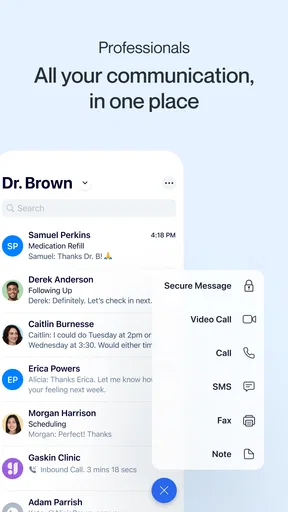
At its core, Spruce: Medical Communication aims to simplify the way healthcare providers communicate with their patients. We all know how cumbersome it can be to juggle multiple communication channels—emails, phone calls, voicemails, and even faxes (yes, they still exist!). Spruce bundles all these into one neat package, so you can have everything in one place. Trust me, it’s a game-changer.
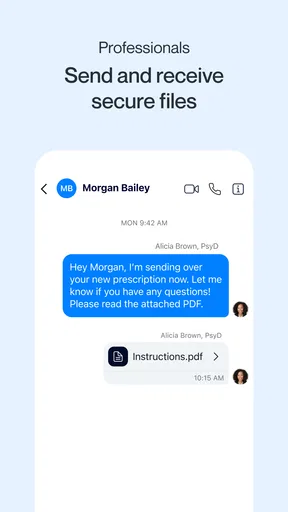
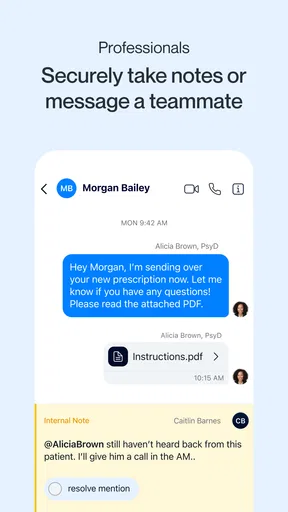
Once you install the app, you'll notice how intuitive it is. The interface is sleek and user-friendly, making it easy even for those who aren’t tech-savvy. The app allows you to send secure messages, manage voicemails, and even conduct video calls—all HIPAA-compliant, of course. This is crucial for maintaining patient confidentiality, and Spruce takes it seriously.
Features That Stand Out
Let’s talk features. One of the standout offerings is the ability to create templates for common responses. Imagine not having to type out the same instructions repeatedly. Just a quick tap, and you’re done. It’s like having a virtual assistant in your pocket.
Templates are especially useful when the same practical guidance comes up throughout the day. I would keep them short and review the wording with the people who will use them, rather than relying on a saved reply for anything that needs individual clinical context. A template can save typing, but the person sending it still needs to check that it fits the patient’s question and does not make the exchange feel automatic.
Another gem is the app’s ability to integrate with your existing workflow. Whether you use a particular electronic health record (EHR) system or a specific calendar app, Spruce can likely sync with it. This integration is crucial for maintaining a seamless workflow and ensures that you don’t miss any important appointments or messages.
For a careful rollout, I would test one workflow at a time and confirm where the relevant information ends up before depending on it. A team should know which system is the source of truth for appointments and clinical records, rather than assuming that every message or calendar detail automatically appears everywhere. That simple check can prevent duplicate work and reduce the risk of staff looking in the wrong place for the next step.
The app also offers a unique feature called "Spruce Visits," which allows you to conduct virtual visits with patients. In today’s world, where telemedicine is becoming increasingly important, this feature is a huge boon. It’s not just about convenience; it’s about providing care without boundaries.
A virtual visit is most helpful when both sides know how it fits into the appointment. I would tell patients in advance how to join and what to do if a video conversation is not suitable for their concern. Video can make a remote appointment more personal than a string of messages, but it is not automatically the right format for every issue, and a practice still needs a plan for cases that call for in-person assessment.
Where Spruce fits—and where it may not
Compared with ordinary email, text messaging, or a general chat app, a medical communication platform is intended to support care-related exchanges in a professional setting. That distinction matters: a practice may value keeping patient conversations apart from personal messages, while a casual messaging app may feel simpler for informal team chatter. The trade-off is that adding a dedicated tool only helps if staff and patients can follow the new process consistently.
For a small practice, a realistic day might involve a patient sending a non-urgent question while the clinician is seeing someone else. A staff member can recognize that it needs a response, direct it to the right person, and make the next step clear rather than letting it disappear among personal texts or a crowded inbox. The benefit is not that every task becomes effortless; it is that the team has a more deliberate place to handle the communication it chooses to bring into Spruce.
This is a stronger fit for clinicians and care teams who regularly manage patient communication and want a dedicated channel for it. I would be more cautious if your organization already has a required communication system that staff must use, or if you only need occasional personal reminders. In those cases, adding another app may create another inbox to monitor without solving a real problem.
Why It’s Worth Your Time
Now, you might be wondering, "Do I really need another app?" Let me tell you, Spruce is worth your time. The app is designed to save you time and reduce the stress that comes with managing patient communications. It’s like having a personal assistant dedicated to handling all your communication needs.
The app’s comprehensive approach means you don’t have to switch between different platforms to get the job done. Everything is integrated into one convenient app, which means fewer headaches and more time to focus on what really matters—your patients.
Still, I would measure the time-saving claim against the actual routine of a practice. If staff have to check several channels anyway, or if patients continue to use a separate route for the same kinds of questions, the gain may be limited. A short team review after trying a defined workflow can reveal whether messages are easier to find and route, or whether the new process is simply adding another stop.
One common point of confusion is the difference between a communication channel and a complete care-management system. Spruce can support messaging, voicemail handling, and virtual visits, but a practice should not assume that adopting it automatically replaces its clinical records, scheduling rules, or procedures for urgent needs. Decide what belongs in the app and what remains in the systems your team already relies on.
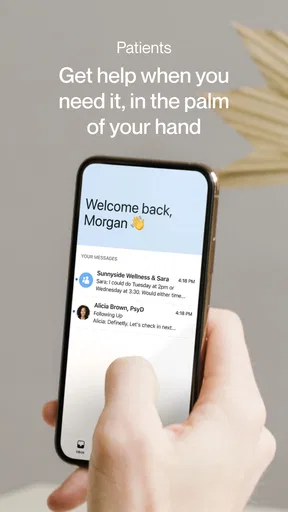
Another practical question is whether patients need to use it for every interaction. I would introduce it for a specific, clearly explained purpose instead of asking people to switch all at once. If a patient is uncomfortable with an app or cannot use video, the practice needs to be ready to explain the available alternative. A communication tool works best when it makes access clearer, not when it becomes an unexplained hurdle.
Moreover, the app’s commitment to security and compliance with medical regulations is commendable. In an age where data breaches are a constant threat, knowing that your communications are secure is a huge relief.
Even with a tool designed for healthcare communication, I would keep everyday security habits in place: use the practice’s agreed procedures, be deliberate about who handles messages, and avoid treating a secure channel as permission to send unnecessary sensitive details. Compliance is important, but good communication still depends on careful decisions by the people using the app.
Final Thoughts
So, what’s the final verdict? In my opinion, Spruce is a solid investment for any healthcare professional looking to streamline their communication channels. It’s efficient, secure, and incredibly user-friendly. Whether you’re a solo practitioner or part of a larger medical team, Spruce has something to offer.
I would start with one small workflow, make sure the team agrees on ownership and follow-up, and then decide whether it genuinely reduces friction. That approach gives you a fair test without forcing patients or staff to change every habit on day one. If the first routine feels clearer and easier to manage, expanding gradually makes more sense than turning on every possible channel at once.
By condensing multiple forms of communication into one platform, Spruce allows you to focus more on providing excellent care and less on administrative tasks. It’s a no-brainer if you ask me. So, why not give it a shot and see how it can transform your practice?
If you’re ready to take the plunge, you can find Spruce: Medical Communication available for download on both Android and iOS. Happy communicating!
Pros
- Intuitive user interface enhances efficiency.
- Secure messaging protects patient privacy.
- Integrates seamlessly with existing systems.
- Real-time updates improve response times.
- Customizable notifications for urgent alerts.
Cons
- Limited offline functionality can be restrictive.
- Requires strong internet for optimal use.
- Some features locked behind premium access.
- Initial setup can be time-consuming.
- Occasional lag in message delivery.
FAQs for Spruce: Medical Communication
What is Spruce: Medical Communication used for?
Spruce: Medical Communication is designed to streamline communication between healthcare providers and patients. It offers a secure platform for messaging, video calls, and appointment scheduling, ensuring that all patient interactions are efficient and HIPAA-compliant. This app is particularly beneficial for practices looking to improve patient engagement and communication.
Is my data secure with Spruce: Medical Communication?
Yes, Spruce prioritizes data security and privacy, complying with HIPAA regulations. The app uses encryption to protect user information during transmission and storage. Users can feel confident that their sensitive medical data and communications are safeguarded according to the highest security standards.
Does Spruce: Medical Communication support multi-platform use?
Absolutely, Spruce is available on both Android and iOS platforms, allowing users to seamlessly access their accounts across multiple devices. This cross-platform compatibility ensures that healthcare providers and patients can communicate effectively, regardless of their preferred device.
Can I use Spruce for video consultations?
Yes, Spruce supports video consultations, enabling healthcare providers to conduct virtual appointments with patients. This feature is particularly useful for telehealth services, allowing for convenient and remote patient care without compromising on quality or security.
How easy is it to set up and use Spruce: Medical Communication?
Spruce is designed with user-friendliness in mind, offering an intuitive interface that both healthcare providers and patients can navigate with ease. The setup process is straightforward, with clear instructions to get started quickly. This simplicity ensures that users can focus more on communication and less on technical issues.


